
Staff
The Staff tab lets you bring other people on board to help run your event. Whether you need a co-TO to help with pairings or a ringer for odd player counts, this is where you set them up.
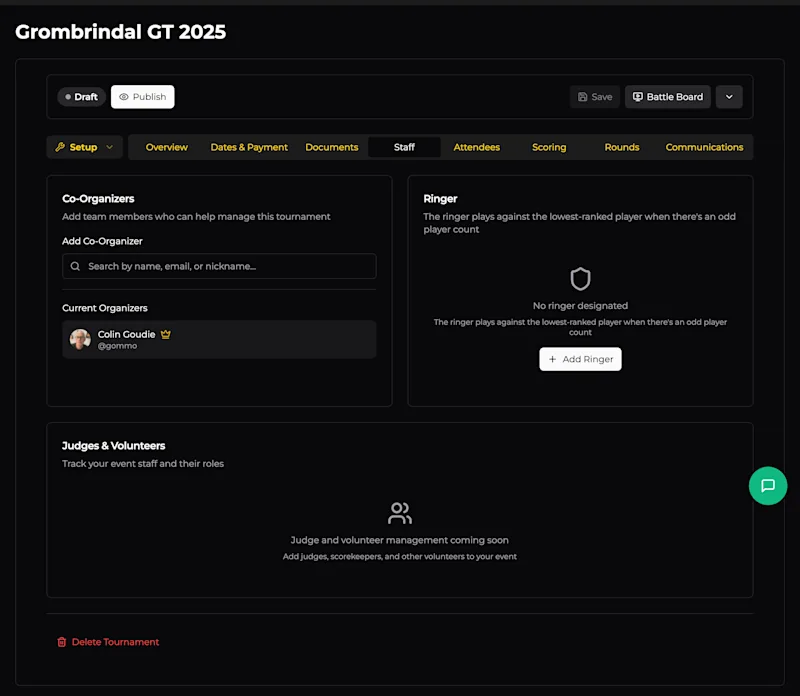
Co-Organisers
Add team members who can help manage the tournament. Co-TOs get access to the same setup and game-day tools as the primary organiser - they can manage attendees, enter results, adjust pairings, and more.
To add a co-organiser, search by name, email, or nickname. They must have an OWR account. Once added, they'll appear under Current Organizers alongside you.
This is useful for events with multiple TOs, or if you want someone else to be able to manage things if you're busy playing a game or handling something at the venue.
Ringer
The ringer is a designated player who steps in when there's an odd number of players in a round. Rather than giving someone a bye, the ringer plays against the lowest-ranked player, keeping every game a real contest.
Click + Add Ringer and search for the player. The ringer doesn't need to be registered for the event - they just need an OWR account. Typically this is one of the TOs or a volunteer who's happy to play casual games as needed.
If you don't designate a ringer, odd rounds will use byes instead.
Judges & Volunteers
(Coming soon) - This section will let you track judges, scorekeepers, and other volunteers alongside their roles. For now, coordinate with your event staff outside of OWR.